Deploying an Express Backend to AWS Lambda with GitHub Actions
Running an Express app locally is simple node index.js, done. Deploying it to AWS Lambda is a different story - not because it's hard, but because Lambda works nothing like a traditional server.
This is how I deployed a Node.js Express backend to AWS Lambda using Serverless Framework, with GitHub Actions handling the CI/CD. The same setup works for any Express API, payment routes, chatbot APIs, webhooks, whatever you’re running.
The Serverless
Lambda doesn’t run a persistent process. There’s no app.listen(3000). Instead, AWS runs your function only when a request arrives, and shuts it down after. This means you pay for actual usage, not idle time, and you don't manage servers.
The catch is that Express wasn’t built for this model. To bridge the gap, this setup uses serverless-http,a small package that wraps your existing Express app and makes it Lambda-compatible without changing your route logic.
// handler.js
import serverless from "serverless-http";
import app from "./index.js";

export const handler = serverless(app);
That’s the only Lambda-specific file you need. Everything else, like routes, middleware, controllers, etc., stays exactly as it is.
How the Deployment Actually Works
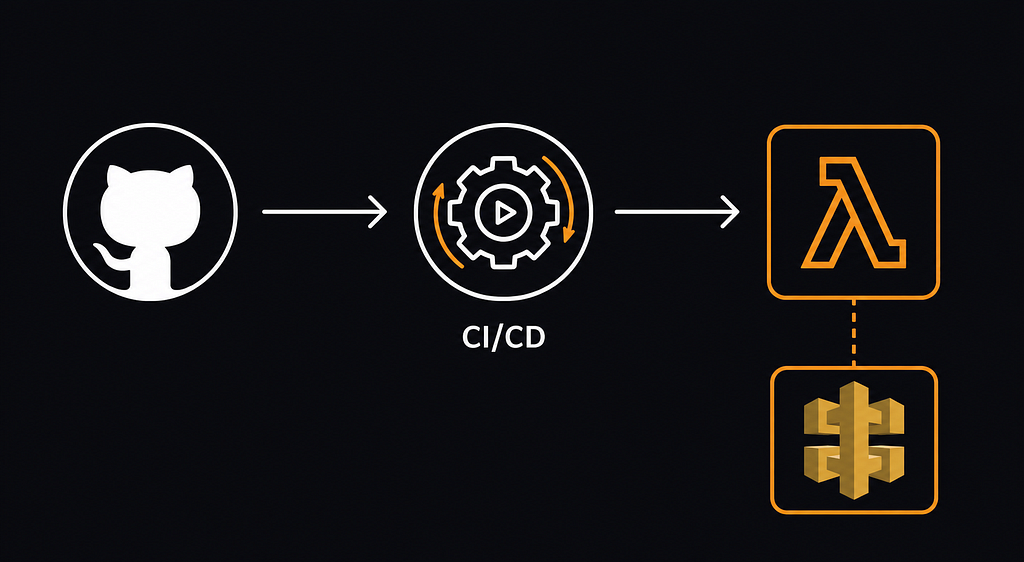
When you push to github, here's what happens:
- GitHub Actions picks up the change
- Installs dependencies with npm ci
- Injects your secrets as environment variables
- Serverless Framework packages the backend and creates/updates AWS resources via CloudFormation
- AWS Lambda gets the new code
- API Gateway exposes a public HTTPS endpoint
Serverless Framework handles the AWS infrastructure for you - Lambda function, API Gateway, CloudWatch log group, and deployment S3 bucket. You don’t touch any of this manually.
The serverless.yml File
This is the core config. Let’s go through the parts that matter:
service: express-lambda
useDotenv: true
provider:
  name: aws
  region: ap-south-1
  runtime: nodejs20.x
  memorySize: 512
  timeout: 29
  environment:
    RAZORPAY_SECRET: ${env:RAZORPAY_SECRET}
    RAZORPAY_WEBHOOK_SECRET: ${env:RAZORPAY_WEBHOOK_SECRET}
    # ... rest of your secrets
  deploymentBucket:
    maxPreviousDeploymentArtifacts: 3
functions:
  app:
    handler: handler.handler
    events:
      - httpApi: '*'package:
  patterns:
    - '!.env'
    - '!.env.*'
    - '!README.md'
A few things worth explaining:
timeout: 29 -API Gateway's default integration timeout is 29 seconds. If your Lambda takes longer, API Gateway returns a 504 before Lambda finishes. Setting your Lambda timeout to 29 keeps them in sync.
memorySize: 512 - Lambda allocates CPU proportionally to memory. More memory = faster cold starts and execution. 512MB is a reasonable starting point for an Express API.
httpApi: '*' - Routes all HTTP requests to your Express app. Express handles the routing internally, so you don't define individual routes in serverless.yml.
package.patterns - The ! prefix excludes files from the deployment package. Always exclude .env files here; you don't want local secrets bundled into the Lambda zip.
maxPreviousDeploymentArtifacts: 3 - Every deploy uploads a zip to S3. Without this, old artifacts pile up indefinitely, and you'll start paying for storage you don't need. Setting it to 3 keeps only the last 3 deployments, which is enough to roll back if something goes wrong.
Environment Variables
Your secrets never go into serverless.yml as plain values. They come from the environment at deploy time, injected either from a local .env file (for local deploys) or from GitHub Secrets (for CI/CD).
Local .env (never commit this):
RAZORPAY_API_KEY=rzp_test_xxxxxx
RAZORPAY_SECRET=xxxxxxxxxxxx
RAZORPAY_WEBHOOK_SECRET=your_webhook_secret
# ... etc
In serverless.yml, reference them like this:
environment:
  RAZORPAY_SECRET: ${env:RAZORPAY_SECRET}
useDotenv: true at the top of serverless.yml tells Serverless to load your .env file automatically when deploying locally.
GitHub Actions Workflow
The workflow lives at .github/workflows/backendDeploy.yml. It runs whenever backend files change on main, and can also be triggered manually.
name: Deploy Backend

on:
  push:
    branches:
      - main
    paths:
      - 'backend/**'
  workflow_dispatch:

jobs:
  deploy:
    runs-on: ubuntu-latest

    defaults:
      run:
        working-directory: backend

    steps:
      - name: Checkout code
        uses: actions/checkout@v4
        with:
          sparse-checkout: |
            backend

      - name: Setup Node
        uses: actions/setup-node@v4
        with:
          node-version: 20
          cache: npm
          cache-dependency-path: backend/package-lock.json

      - name: Install dependencies
        run: npm ci

      - name: Install Serverless
        run: npm install -g serverless

      - name: Deploy
        run: serverless deploy
        env:
          AWS_ACCESS_KEY_ID: ${{ secrets.AWS_ACCESS_KEY_ID }}
          AWS_SECRET_ACCESS_KEY: ${{ secrets.AWS_SECRET_ACCESS_KEY }}
A few things here:
paths: ['backend/**'] - Prevents a frontend-only change from triggering a backend redeployment. Saves time and avoids unnecessary Lambda updates.
sparse-checkout: backend - Only checks out the backend folder instead of the whole repo. Faster, especially on larger monorepos.
workflow_dispatch - Let's you manually trigger the deployment from the GitHub Actions tab. Useful when you need to redeploy without pushing new code.
One thing that will silently break CI/CD: Serverless Framework v4 requires authentication even for free users. In GitHub Actions, it won’t prompt you; it just fails. The fix is adding SERVERLESS_ACCESS_KEY as a GitHub secret (get it from the Serverless Dashboard) and passing it in the deploy step, which the workflow above already does.
GitHub Secrets Setup
In your repo, go to Settings → Secrets and variables → Actions → New repository secret and add:
AWS_ACCESS_KEY_ID
AWS_SECRET_ACCESS_KEY
SERVERLESS_ACCESS_KEY
# ... any other secrets your backend needs
Secrets are encrypted and only available to workflows that explicitly reference them.
AWS Credentials: Access Keys vs OIDC
The workflow above uses AWS_ACCESS_KEY_ID and AWS_SECRET_ACCESS_KEY. This works fine for a personal project or small startup.
The more secure approach is GitHub OIDC. Instead of storing long-lived AWS credentials in GitHub, OIDC lets GitHub Actions request short-lived credentials from AWS on each run. Nothing to rotate, nothing to accidentally expose.
With OIDC, you no longer need AWS_ACCESS_KEY_ID or AWS_SECRET_ACCESS_KEY in your secrets at all.
To set it up, create an IAM role in AWS that trusts GitHub’s OIDC provider and scope it tightly to your repo and branch
For a college project or quick MVP, long-lived keys are fine. For anything you care about in production, OIDC is worth setting up.
Checking Logs
When something breaks in production, CloudWatch is where you look.
AWS Console: CloudWatch → Log groups → search for your function name → open the latest log stream.
Logs will tell you about missing environment variables, Razorpay signature failures, database connection errors, and Lambda timeout issues. Check them after every first deployment.
Things I Ran Into
Environment variable not resolving - Usually means the variable isn’t in your local .env or GitHub Secrets. Add the missing value and redeploy.
API returns 500 after a successful deploy - Almost always, a missing or incorrect environment variable inside Lambda. Check CloudWatch logs first.
Frontend can’t reach the backend - Check BACKEND_URL, rebuild the frontend, and verify CORS. These three things cover 90% of frontend-backend connection issues post-deploy.
Razorpay webhook returns 400 - Usually a mismatch between the webhook secret in Razorpay’s dashboard and the RAZORPAY_WEBHOOK_SECRET in your Lambda environment. They must be identical.
Before You Go Live
- serverless.yml has the correct AWS region
- handler.js exports the Lambda handler correctly
- .env is excluded from the deployment package
- All secrets are added to GitHub
- SERVERLESS_ACCESS_KEY is set (Serverless v4)
- AWS credentials or OIDC role can deploy CloudFormation, Lambda, API Gateway, IAM, S3, and CloudWatch
- Frontend BACKEND_URL points to the deployed endpoint
- Razorpay webhook URL is updated in the dashboard
- CloudWatch logs checked after the first deployment
Wrapping Up
The setup is straightforward once you understand the pieces: serverless-http bridges Express to Lambda, serverless.yml describes your infrastructure, and GitHub Actions automates the whole thing on every push.